
NDT Inspection & Reporting Software
Inspection and reporting software for NDT services companies in the oil & gas, aerospace, and industrial machinery industries.
Fully Customizable Test Templates | Historical results and Issue Tracking | Professional Report Generation in minutes
The Challenges
-
Assembling hundreds of Excel spreadsheets to put together a final report is time consuming and cumbersome.
-
Every customer wants their reports a different way – clients, industries, and inspection methods require unique report formats and information.
-
Historical inspection results and unresolved indications are buried in old spreadsheets and PDFs.
-
Procedures, revisions, acceptance criteria, tech qualifications, and instrument details are disconnected from the inspection record.
The Answer
FieldTestPRO enables:
-
Professional report generation in minutes including: branded cover page, statement of work, disclaimers, table of contents, issue summary and test result forms
-
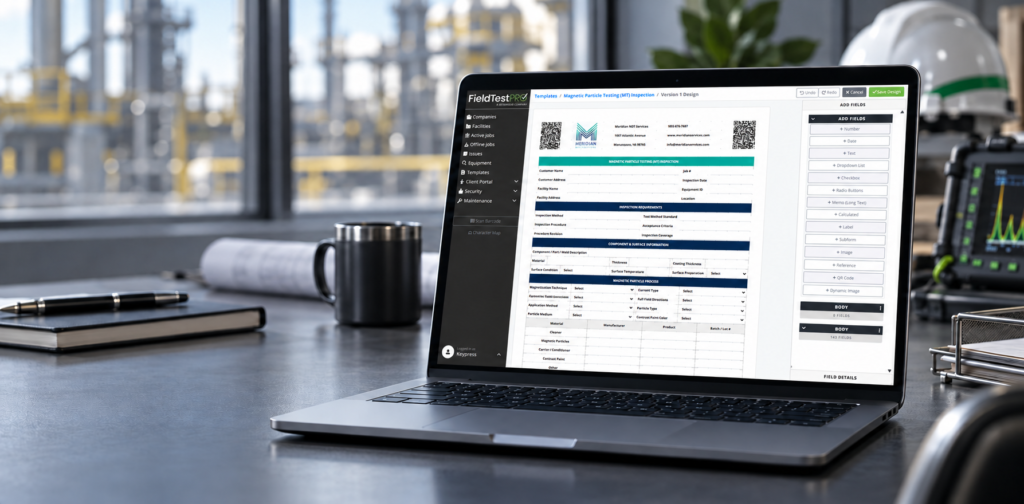
Flexible inspection template creation for various NDT methods, customer requirements, and reporting needs. Including version control or traceability.
-
Real time visibility into historical results and previously identified issues.
-
Test report form editor that displays: standards or specifications for the equipment or method, advanced calculation capabilities for deficiency identification and calculated results.
Built for Your Work – Feature Highlights
See all of FieldTestPRO’s Features
FAQ for NDT
FieldTestPRO is not locked into specific inspection methods. FieldTestPRO’s customizable and version-controlled templates allow for the collection of data for most NDT methods including:
Ultrasonic Testing (UT) ,
Liquid Penetrant (PT),
Eddy Current / Electromagnetic (ET),
Radiographic Testing (RT),
Computed Radiography (CR),
Digital Radiography (DR),
Magnetic Particle (MT),
Visual Testing (VT)
FieldTestPRO allows for organizations to maintain standards or controls associated with a various equipment and templates so that processes and requirements are readily available to technicians in the field.
Calculated Template fields and flagging logic allow FieldTestPRO templates to automatically calculate values and flag deficiencies that technicians may miss.
FieldTestPRO’s cloud-based system allows supervisors to review test results as they are entered into the system to identify concerns.
FieldTestPRO maintains traceability by tying each inspection and its recorded indications or findings to the specific asset or component being tested, the technician performing the inspection, the applicable procedure and revision, and the resulting inspection report.
Procedure numbers, revisions, applicable standards, equipment used, test conditions, and other required information can be captured as part of the test record. FieldTestPRO’s template versioning also preserves the version of the test template used when the inspection was performed, so later template changes do not alter the historical inspection record.
Indications and findings can include their location, type, measurements, disposition, comments, and supporting images. This information remains associated with the inspection record and final report, providing a traceable history from the observed condition through evaluation and reporting.
Yes. Because your inspection results are associated with the equipment being tested and the template capturing the results, FieldTestPRO can track historical results and display that to the technician in the form editor, and to the customer in the results portal.
In addition to results, flagged values are captured as issues and the recurrence of those flagged values are captured as incidents of the issue. This ensures deficiencies are captured and tracked over time.
Yes. Our user-friendly template designer enables testing form templates to be designed for each set of customer requirements or specification.
Want to see FieldTestPRO in action?